Weather Mate - Local Weather
- 4.1
- Rating
- 100.00K
- Installs
- Free
- Price
 Analysis by App-foxy
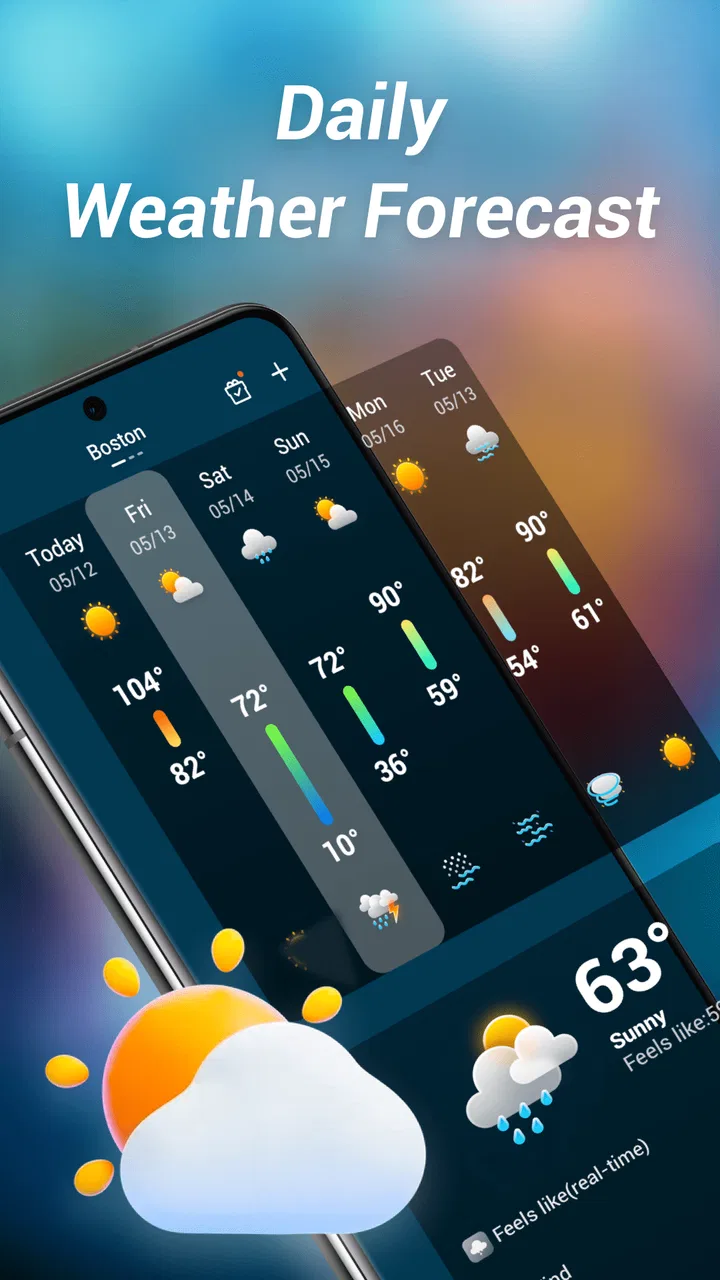
Weather information is only useful when I can understand it quickly and act on it, whether I am checking a morning commute, planning a walk, or deciding if outdoor work can wait. Weather Mate - Local Weather takes a straightforward approach to that everyday task. I found it most appealing as a simple weather app for people who want a local forecast without turning the experience into a complicated dashboard. Its focus is practical: open it, read the current conditions and daily report, then make a decision.
That simplicity also makes the app worth considering from an inclusive point of view. A weather screen needs to work for people with different levels of vision, dexterity, attention, confidence with technology, and access to a stable connection. In my experience, Weather Mate is easiest to appreciate when used as a quick reference rather than as a full replacement for every specialist weather source. It is free, suitable for Everyone, and developed by Bersamakitta, which gives it a low-risk starting point for casual users.
How clearly Weather Mate presents everyday weather information
The first strength I noticed is that the app’s purpose is easy to understand. It belongs to the weather app category, not a broader travel or lifestyle tool where forecasts are buried among unrelated features. That matters for anyone who prefers a direct path from opening an app to finding the information they need. A person checking conditions before leaving home should not have to learn a complex system first.
You May Also Like

 Blood Strike: 2.5 Anniversary
Blood Strike’s Loadouts Turn Every Drop Into a Tactical Gamble
A close look at Blood Strike’s custom loadouts: how fast access to signature weapons reshapes its battle royale rhythm, rewards preparation, and narrows the gap between fights.

 Pandora - Music & Podcasts
Pandora’s Music Is Easy to Start, but Harder to Recover
Pandora’s strength is its low-effort path from a seed to a station. Its weak spot is how much confidence it asks you to place in connection, setup, and quiet recovery.

 8 Ball Pool
 Is Built on Rivalries, Rematches, and Routine
A close look at the rivalries, rematches, shared routines, and unanswered safety questions that turn a quick pool match into a persistent mobile community.

 Samsung Music
’s Quiet Strength Is Playing What You Already Own
Its reach comes less from spectacle than from dependable access to a personal library. That simplicity is both the app’s strongest retention engine and its ceiling.

 AccuWeather: Weather Radar
AccuWeather Review: A Quick, Clear Forecast for Everyday Decisions
For everyday plans, the best forecast is the one you can understand quickly. AccuWeather makes rain timing, radar, and local conditions easy to act on, with a few trade-offs.

 Hill Climb Racing
Why Hill Climb Racing Still Turns Crashes Into One More Run
A tiny car, a bumpy hill and one more upgrade: Hill Climb Racing keeps resurfacing because its simple chaos makes every near-miss feel personal.
More From Our News Desk



The short name Weather Mate sets the right expectation: this is intended to be a companion for local conditions, not a technical meteorology workstation. The store summary emphasizes local forecasts and daily reports, and that focus gives the experience a useful boundary. I would recommend it to someone who wants a readable daily overview and does not need to compare many weather models or inspect detailed atmospheric charts.
Navigation is especially important for users who may find dense interfaces tiring. A weather app can become difficult when it places too many panels, icons, animated maps, and changing numbers on one screen. Weather Mate’s appeal is that it keeps the main task recognizable. I can approach it with a simple question—what should I expect today?—instead of having to decide which of several technical displays matters.
That does not mean a simple design automatically works for everyone. Readability depends on factors such as text size, contrast, spacing, and how clearly icons are explained. I would still advise anyone with low vision to test the app on their own phone, enlarge the system display where necessary, and check whether the most important information remains comfortable to read. The app is promising for quick scanning, but comfort is personal and cannot be judged only by the number of screens.
One useful habit is to establish a personal checking routine. I would open the app at the same point each morning, read the local conditions first, and then look at the daily report before deciding what to wear or carry. This reduces the need to explore the interface repeatedly. For a family member who is less confident with smartphones, that repeatable routine may be more valuable than a long list of advanced options.
Readable information is more useful than impressive detail
When I compare Weather Mate with the usual alternatives, the main difference is not necessarily the amount of information but the amount of effort required to interpret it. Many popular weather services combine forecasts with radar, alerts, news, advertising, location lists, and personalization. Those additions can be useful, yet they also create more opportunities for distraction or confusion. Weather Mate makes more sense for a reader who values a calm daily check over a broad weather toolkit.
There is a trade-off here. A compact local report may be easier for someone with limited attention or who becomes overwhelmed by visual clutter, while a more detailed service may be better for a user who needs minute-by-minute rain timing, storm tracking, or specialist data. I would not choose this app solely because its screen feels simpler; I would choose it when the daily report answers the questions I actually ask.
The app’s current version is 1.0.26, so I approached it as a relatively focused product rather than a mature platform with years of accumulated tools. That can be an advantage for clarity, but it also means users should keep their expectations realistic. People who enjoy exploring layers of information may find the experience less satisfying than a larger weather service.
Motor comfort and sensory considerations
Weather Mate is a good candidate for short, low-effort interactions. Checking a forecast usually requires only a few taps, and that is helpful for people who have limited hand control, fatigue quickly, or prefer not to perform a long sequence of gestures. A simple workflow also reduces the chance of accidentally changing settings while trying to reach the forecast.
For motor accessibility, I would use the app in a way that minimizes precision demands: keep the phone at a comfortable angle, avoid trying to operate it while walking, and use the device’s normal touch settings if taps feel difficult. A larger system interface may make controls easier to target, although enlarging everything can also change how much content fits on screen. This is one of the practical trade-offs to test rather than assume.
People who are sensitive to motion or visual stimulation may prefer a weather tool that presents information without making animation the center of the experience. Weather Mate’s local-report orientation feels better suited to a calm check than to constant visual monitoring. Still, the most important question is whether symbols are understandable without relying on color alone. If a user has color-vision differences, the wording and icons need to communicate the condition clearly enough without asking the user to distinguish subtle shades.
For users with hearing loss, a visual weather report is naturally more useful than an audio-only update. The app’s basic purpose is compatible with checking information silently in a workplace, library, classroom, or shared home. On the other hand, someone who relies heavily on spoken output should test how well the phone’s screen reader handles the forecast labels and controls. I would not assume that every visual weather element is announced in the most helpful order.
This is also where the app’s simplicity can work both ways. Fewer controls can mean fewer obstacles for someone using switch access or another assistive input method, but only if the focus order is sensible and the controls have clear names. If navigation becomes awkward with an assistive technology setup, a more established weather app with stronger accessibility support may be the better choice.
Using the forecast in real situations
A realistic example is a commuter who has reduced vision and wants to prepare before leaving. Instead of trying to read a long forecast while standing at a bus stop, that person could check Weather Mate at home, enlarge the phone’s display, and use the daily report to decide whether to take a raincoat or change travel plans. The value is not just the forecast itself; it is the chance to make the decision in a quiet setting with enough time and light.
Another example is a parent managing several tasks in the morning. A quick local check can help decide whether children need extra layers, waterproof shoes, or a different activity. The app is useful here because the question is broad and practical. I would not expect it to replace a more detailed source when a severe-weather decision requires close monitoring, but it can serve as the first step in a daily routine.
For outdoor workers, gardeners, cyclists, and people with health conditions affected by heat or cold, the daily report can be a convenient planning aid. I would use it before committing to a task, then check a more specialized service if the activity depends on precise timing or rapidly changing conditions. That two-step workflow is one of the best ways to use Weather Mate without asking it to do a job it may not be designed for.
It may also suit older adults who want a less intimidating starting point. The app is free, and its Everyone age rating makes it approachable for a broad household. A relative could install it, set up the local view, and practice the same morning sequence each day. The important support is not simply handing over the phone; it is showing which part of the screen contains the current conditions and which part provides the daily outlook.
Location context deserves attention in everyday use. A local forecast is most helpful when it reflects the place the user actually cares about. Someone who travels between home, work, and a second residence should make a habit of checking the displayed location before trusting the result. A forecast can be perfectly readable and still be unhelpful if it is for the wrong place. I consider this a user workflow issue worth remembering with any local weather app.
Where the app may create friction
The biggest limitation is the same quality that makes Weather Mate attractive: it appears aimed at uncomplicated daily checking. Users who want a complete weather command center may miss advanced views, detailed comparisons, or highly specialized tools found in larger alternatives. If you plan hikes around narrow weather windows, monitor storms, or need detailed information for aviation, marine travel, or professional operations, I would look beyond this app.
There is also a difference between being simple and being fully accessible. A clean interface can reduce cognitive load, but inclusive design also depends on text scaling, contrast, touch target size, labels, focus behavior, and compatibility with assistive technologies. These details affect real people every day. I would encourage users who depend on a particular accessibility setting to test the complete journey—from opening the app to locating the local report—rather than judging it from the first screen.
Another practical limitation is that a daily report does not remove the need for judgment. Weather changes, and a general outlook may not answer a question about conditions at a specific hour or on a particular route. I would avoid using any single app as the only basis for a safety-critical decision. Weather Mate can be the convenient first check, while official emergency information or a more detailed forecast handles situations where accuracy and timeliness matter most.
Some users may also prefer audio interaction, widgets, notifications, or a richer glanceable experience. I would choose a different service if I needed the forecast to reach me automatically without opening the app, or if I wanted to see several locations at once. Weather Mate makes more sense for someone comfortable with an intentional check: open the app, read the local report, and continue with the day.
Because the app is free, it is easy to try without committing money. That lowers the cost of discovering whether the layout suits a particular person. The more important cost is attention: if the app requires repeated searching for basic information, causes strain, or does not work well with a user’s preferred phone settings, the free price does not make it the right tool.
Who should use it and who should choose another option
I would recommend Weather Mate to people who want a focused local forecast for ordinary planning. It is particularly suitable for users who prefer a short daily report, dislike overloaded weather dashboards, or are helping a family member adopt a straightforward weather routine. Its 100K-plus installs and a 4.1 average from around 847 ratings suggest that it has found an audience, while the smaller review count of about 35 means I would treat public feedback as useful context rather than a complete picture of every experience.
I would be more cautious about recommending it to users who need extensive accessibility customization, automatic alerts, detailed radar analysis, or specialist forecasting. Those users should compare it with a larger weather service and test the exact features they depend on. The right choice is not the app with the most information; it is the one that presents the necessary information in a form the person can reliably use.
For someone unsure where to start, my advice is simple. Install it, set up the local view, and check whether the current conditions and daily report can be found without assistance. Then try the phone’s larger text or display settings, rotate the device if that is part of the normal routine, and see whether the forecast remains comfortable to read. Finally, compare one ordinary day with the weather source you already trust. This reveals more than a quick glance at the store page.
The app’s release on Jun 9, 2025, and its current version, 1.0.26, place it in an early stage of its life compared with long-established weather platforms. I see that as a reason to judge it by the quality of its core experience rather than expecting a huge ecosystem. If Bersamakitta continues refining clarity and support for different ways of interacting with a phone, the focused foundation could become more valuable over time.
My inclusive verdict
After looking at Weather Mate as both a weather tool and an everyday accessibility choice, I see a useful, approachable option for routine local checks. Its strongest quality is restraint: it aims to help me understand the day’s weather without demanding that I become a weather enthusiast first. That can benefit people who have limited time, limited attention, or simply prefer a quieter interface.
The best reason to choose Weather Mate is that it keeps a basic decision—what should I expect today?—within easy reach. I would still test text size, contrast, icon clarity, screen-reader behavior, and touch comfort on the individual device, because those factors determine whether a simple app is genuinely usable. No single layout serves every ability equally well.
My final recommendation is therefore conditional but positive. Try it if you want a free, focused daily weather companion and your needs are centered on local conditions. Keep another source available when you need urgent alerts, detailed timing, or specialist information. For the right user, Weather Mate can become a low-friction part of the morning routine; for someone requiring deep customization or advanced forecasting, a more feature-rich alternative will likely be the better fit.
FAQs for Weather Mate - Local Weather
01What is Weather Mate - Local Weather used for?
Weather Mate - Local Weather is designed to provide current conditions and forecasts for your selected locations. After setting up a city, you can generally check details such as temperature, precipitation, wind, humidity, and other useful weather information in one place. It can be helpful for planning commutes, outdoor activities, trips, or daily routines, although forecasts should always be treated as estimates rather than guaranteed predictions.
02Does Weather Mate - Local Weather use my location?
The app may request location permission so it can automatically identify your current area and display relevant local conditions. You can usually choose whether to allow this access, enter a location manually, or manage permissions later through your device settings. If privacy is important to you, review the permission request carefully and remember that disabling location access may require you to search for and update cities yourself.
03Can I add multiple locations and receive weather alerts?
Weather Mate - Local Weather is intended to support users who want information for more than one place, such as home, work, a holiday destination, or a family member’s city. Depending on the version and device, it may also offer notifications or severe-weather alerts. Availability can vary by region, operating system, and enabled settings, so check the app’s notification controls before relying on it for important warnings.
04Is Weather Mate - Local Weather free to download and use?
The application may be available as a free download, but some features can depend on advertising, optional purchases, or a premium subscription. Before installing, review the listing for details about in-app purchases and recurring charges. It is also worth checking whether advanced forecasts, ad removal, extra widgets, or additional locations are restricted, since the exact offer can change between Android and iOS versions.
05How accurate is the information provided by Weather Mate - Local Weather?
Weather Mate - Local Weather presents forecast data supplied by external weather services, so accuracy depends on the provider, your location, local conditions, and the forecast period. Short-term information is usually more dependable than predictions several days ahead, while rapidly changing storms can reduce reliability. Use the app as a convenient guide, and consult official emergency or meteorological services for serious weather warnings.
Pros
- Clear hourly and daily forecasts for quick planning
- Useful weather alerts help users prepare for sudden changes
- Location support makes forecasts convenient while traveling
- Clean layout keeps key conditions easy to find
- Includes practical details such as wind
- humidity
- and visibility
Cons
- Some advanced features may require a paid subscription
- Forecast accuracy can vary by location and weather conditions
- Frequent alerts may feel excessive for some users
- The app may use noticeable battery for background updates
- Advertising can reduce the experience in the free version

Weather Mate - Local Weather
Gallery